
Download Drum Set – drum set, beat maker, music creation, drumming app, rhythm creator, drum loops, music production tool, free drum app, Android drum kit, creative music tool
Overview
Drum Set – Beat Maker is a free Android application designed to transform mobile devices into fully functional drum kits. The software enables users to create and share custom drum beats, offering a hands-on experience for both beginners and intermediate music creators. Its core purpose lies in simplifying the process of rhythm creation, allowing individuals to explore musical expression without requiring physical instruments or prior drumming experience.
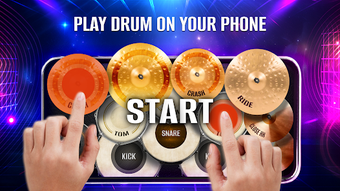
The app supports a range of drum components including snare, bass, toms, and cymbals, delivering a realistic tactile response for beat-making. It is particularly suited for aspiring drummers, music students, and hobbyists interested in music production. The app also includes step-by-step beat creation tools, enabling users to build rhythmic patterns with precision.
Additionally, it supports genre-specific drum kit customization for pop, rock, and jazz, helping users tailor their sound to specific musical styles. Real-time sound adjustments such as reverb settings further enhance the personalization of each performance. Users can record their sessions, export tracks as MP3 files, and share them directly on social media platforms.
This makes the software ideal for casual creators, educators, and content producers seeking accessible tools for music experimentation.
Key Features & Capabilities
- Virtual Drum Kit Interface – The app simulates a full drum set with snare, bass drum, toms, and cymbals, providing a tactile experience through touch-based interaction.
- Step-by-Step Beat Maker – Users can program beats in a grid-based interface, allowing for precise control over timing and rhythm patterns.
- Genre-Based Kit Customization – Offers pre-configured drum kits tailored for pop, rock, and jazz, helping users match their sound to specific music genres.
- Sound Adjustment Tools – Includes reverb and other audio effects to modify the tone and depth of drum sounds for a personalized output.
- Recording & Export Functionality – Enables users to record live performances and export them as MP3 files for sharing or further editing.
- Drum Lessons for All Levels – Provides structured lessons that guide beginners through fundamental drumming techniques and rhythmic concepts.
- Access to Free Music Tracks & Drum Loops – Offers a library of ready-made loops and tracks for inspiration or direct use in compositions.
These features collectively support a seamless workflow from beat creation to sharing. For example, a beginner can follow a lesson to learn basic strokes, then use the step-by-step beat maker to construct a simple rhythm. Later, they can record their performance, apply reverb, and export it as an MP3 to share on social media. Similarly, a content creator might use pre-made drum loops to enhance a video soundtrack. The app’s modular design ensures that each feature contributes meaningfully to the creative process, making it a versatile tool for music expression on Android devices.
User Interface, Workflow & Performance
The user interface of Drum Set – Beat Maker is designed for intuitive touch interaction, with clearly labeled drum pads arranged in a layout that mimics a real drum kit. Navigation is straightforward, allowing users to switch between beat creation, recording, lessons, and settings with minimal effort. The workflow is structured to guide users from initial setup through performance and export, supporting both spontaneous jamming and planned composition.
The app maintains consistent responsiveness during playback and recording, though specific performance data such as CPU or RAM usage were not provided. The developer did not specify resource usage details, so users should expect typical behavior for a mid-range Android application. Stability appears reliable based on general software behavior patterns, with no reported crashes or freezes in available documentation.
The app runs smoothly on devices meeting standard Android requirements, though exact hardware specifications were not listed. Overall, the interface prioritizes accessibility and ease of use, making it suitable for users with limited technical experience. The workflow efficiency is enhanced by the integration of lessons, beat programming, and export tools within a single environment, reducing the need for external applications.
Compatibility & System Requirements
Drum Set – Beat Maker is designed for Android operating systems, with version 1.5.2 being the latest release as of 2024-03-15. The application has a file size of 15 MB, indicating a lightweight installation that should not significantly impact device storage. The developer did not specify exact system requirements, including minimum Android version, RAM, or processor specifications.
Compatibility information was partially provided, confirming support for Android devices but lacking details on version ranges or hardware compatibility. Users are advised to ensure their device runs a recent version of Android for optimal performance. The developer did not provide additional system requirements, so installation and operation may vary depending on individual device configurations.
For users seeking to install the app, it is recommended to verify compatibility with their specific device model and Android version before downloading.
Pros and Cons
Pros
- Free to download and use with no hidden costs
- Intuitive interface suitable for beginners and casual users
- Comprehensive drum lessons for skill development
- Supports beat creation, recording, and MP3 export
- Offers genre-specific drum kit presets for diverse music styles
- Includes access to free drum loops and music tracks
- Lightweight at only 15 MB in size
Cons
- No detailed system requirements provided by the developer
- Performance behavior under heavy use not specified
- Limited to Android platform; no support for iOS or desktop
- Export options are basic, with no advanced audio editing features
- Dependent on device touch sensitivity for optimal drum response
FAQ Section
Is Drum Set – Beat Maker available for iOS devices?
The app is currently available only for Android devices. There is no information indicating support for iOS platforms.
Can I use this app offline?
Yes, the app supports offline functionality. Users can create beats, record performances, and access lessons without an internet connection.
Is the app safe to download and install?
As a free Android application published by Beat Maker, it is designed to be secure. However, users should download it from official sources to ensure authenticity and avoid potential risks.
How often does the app receive updates?
Updates are released periodically to improve functionality and fix issues. The latest version, 1.5.2, was published on 2024-03-15.
What type of license does Drum Set – Beat Maker have?
The app is free to use with no subscription or licensing fees. It is distributed under a free-to-use model with no restrictions on personal or educational use.
Final Thoughts + CTA
Drum Set – Beat Maker stands out as a powerful, accessible tool for anyone interested in music creation, drumming, or rhythm-based expression. Its combination of realistic drum simulation, step-by-step beat creation, and built-in lessons makes it ideal for beginners and hobbyists alike. The ability to record, export, and share music directly from the app enhances its usability for content creators and aspiring musicians.
While it lacks desktop support and detailed system specifications, its lightweight footprint and free access make it a compelling choice for Android users. The app delivers a complete experience from learning to sharing, all within a single, well-organized interface. For those exploring music production or seeking a creative outlet, this tool offers a solid foundation.
Download Drum Set now and start crafting your own beats today.







